
Reviews
Paw Patrol Art Studio offers a delightful and safe creative outlet for young fans of the series. The interface is simple enough for toddlers to use, yet engaging for older kids. The variety of scenes keeps the experience fresh, and the zoom and undo tools are practical. Best of all, there are no ads or purchases, making it a worry-free choice for parents.
About this game
Game Introduction
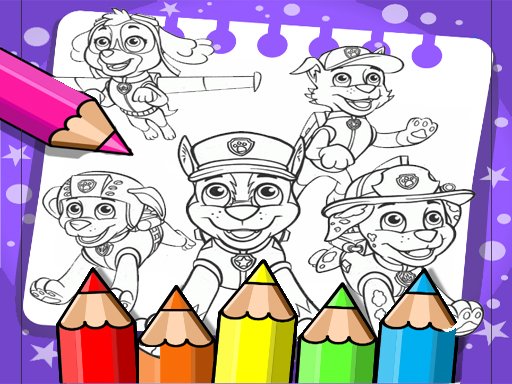
Paw Patrol Art Studio is a free online coloring game designed for children of all ages. It offers a safe and creative environment where kids can explore their artistic side by coloring scenes from the popular Paw Patrol series. The game features beloved characters such as Chase, Marshall, Skye, and Rubble, each appearing in various fun scenes. The core objective is simple: select a coloring page and use the provided palette to bring the black-and-white outlines to life with color. This activity helps develop important skills like focus, hand-eye coordination, and color recognition. The interface is intuitive, making it easy for young children to navigate independently. There are no hidden costs or inappropriate content, ensuring a wholesome experience for families. The game is completely free to play, with no advertisements or in-app purchases, allowing uninterrupted creative play.
How to Play
Players begin by choosing a coloring page from the available collection of Paw Patrol scenes. A color palette is displayed on the side of the screen, offering a variety of hues. To color, simply click or tap on the area you wish to fill, and the selected color will be applied instantly. For more detailed work, players can zoom in on specific sections. If a mistake is made, an undo button allows for easy correction. Once the artwork is complete, players have the option to save it to their device or share it with family and friends. The controls are designed to be straightforward, so even very young children can play without assistance.
Game Features
The game includes a wide variety of coloring pages featuring popular Paw Patrol characters. It offers a simple, kid-friendly interface that is easy to navigate. Tools such as zoom and undo are provided to assist with precise coloring and error correction. Finished artwork can be saved or shared. The game is completely free and safe for all ages, with no ads or in-app purchases, ensuring a distraction-free creative experience.
Tips for Success
Encourage children to experiment with different color combinations to make each scene unique. Using the zoom tool can help with coloring small details more accurately. If a mistake occurs, the undo button makes it simple to fix without frustration. Saving finished pictures allows kids to see their progress and share their creativity with others.
✅ Compatibility & Testing
• Desktop (Windows 11, macOS Ventura)
• Mobile (iPhone 14, Samsung Galaxy S23)
• Tablet (iPad Pro, Android tablet)
✅Supported browsers: Chrome, Safari, Edge, Firefox (latest versions)
❌ Not supported: Internet Explorer, older browser versions
Advertisement
Faq
Is Paw Patrol Art Studio available on mobile devices?
The game is designed to work on most modern web browsers, including those on tablets and smartphones. For the best experience, ensure your device has a stable internet connection and a touch-friendly screen.
Do I need to create an account to play?
No account is required. The game is accessible directly from the website without any registration or login. This makes it easy for children to start playing immediately without sharing any personal information.
Can I print the coloring pages from the game?
The game currently focuses on digital coloring. While there is no built-in print function, you can save the finished artwork to your device and then print it using your device's standard printing options.
Are there new coloring pages added regularly?
The game may receive updates with new scenes from time to time. However, the specific update schedule is not guaranteed. The existing collection offers a variety of pages to keep children engaged for many sessions.
Is there a time limit for each coloring session?
There is no time limit. Children can take as long as they like to complete each coloring page. This encourages relaxed, creative play without pressure.
Can multiple children use the same device to play?
Yes, the game does not save personal profiles, so multiple children can take turns using the same device. Each child can simply choose a new page and start coloring independently.









Comments
0 comments