← Back to Games
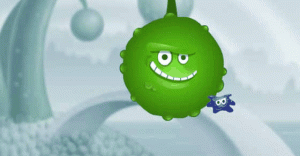
Paint World 2 Color Merge Puzzle
Developer: Village Edge Digital
Published: 2026-09-30
Updated: 2026-09-30
Loading Game Image...
Reviews
Paint World 2 Color Merge Puzzle takes a simple merge mechanic and turns it into a thoughtful logic exercise. The lack of a timer encourages planning, and the progressive layouts keep the challenge fresh. Its browser-based, download-free format and touch support make it accessible. The main limitation is that the core loop may feel repetitive for players seeking more varied puzzle types, but for those who enjoy color-matching and strategic ordering, it offers a solid casual challenge.
Description
Merging Mechanics and Player Actions
In Paint World 2 Color Merge Puzzle, the board holds several paint creatures in different colors. Your task is to select a creature, then drag and throw it into another of the same color. A successful collision merges the two into one, decreasing the total count. The goal is to keep merging until only a single creature of each color is left. Throws that connect different colors do not merge and can complicate the board layout, so each toss is a small decision about order and direction.Progression and Puzzle Design
Each level presents a new arrangement of creatures and color combinations. Early boards are straightforward, but later stages require planning several moves ahead to avoid isolating colors or creating unmergeable clusters. The game does not rush you; you can study the board and restart a level if a sequence fails. This structure makes Paint World 2 suitable for short breaks or longer sessions, with difficulty that grows through layout complexity rather than time pressure.Visual Feedback and Accessibility
Bright visuals and cheerful creature designs keep the board readable. When creatures merge, clear feedback confirms the action, helping you track progress. The game runs directly in a browser without downloads, and controls work with both mouse and touchscreen. Its family-friendly presentation and simple rules make it approachable for children and adults, while the logic behind efficient merges offers enough depth for players who enjoy planning.Approaches to Solving Levels
Before throwing, scan the board for colors that appear in odd numbers or are clustered near edges. Merging those first can prevent bottlenecks. Experiment with throwing angles: a direct toss may work, but sometimes a slight arc avoids unintended collisions. If a level stalls, restarting with a different merge order often reveals a cleaner path. Patience and observation matter more than speed, since the game rewards thinking ahead rather than rapid tapping.Compatibility
💻 Desktop | 📱 Mobile | 📟 Tablet
– All supported · Best with Chrome or Safari
Faq
What is the main goal in Paint World 2 Color Merge Puzzle?
The objective is to merge all paint creatures of the same color by tossing them into each other. You continue until only one creature of each color remains on the board. Reducing the total number of creatures is the measure of progress in every level.
Can I play Paint World 2 Color Merge Puzzle on a mobile device?
Yes, the game supports touchscreen controls in addition to mouse input. It runs in a web browser, so you can play on smartphones, tablets, or computers without installing an app. The drag-and-throw mechanic works with a finger or a cursor.
Does Paint World 2 Color Merge Puzzle have a time limit?
No time limit is mentioned in the game's description. You can take as long as you need to plan each throw. The challenge comes from the puzzle layout and color combinations, not from racing a clock, which makes it suitable for relaxed play.
What happens if I throw a creature into a different color?
Throwing a creature into a different color does not merge them. Instead, it can create new challenges by leaving both creatures on the board in positions that may be harder to resolve later. Careful color matching is essential to avoid trapping yourself.
Is Paint World 2 Color Merge Puzzle suitable for children?
The game is described as family-friendly with no inappropriate content. Its bright visuals and simple drag-and-throw controls are easy for younger players to understand. The logic puzzles scale in difficulty, so kids can start with easier levels and improve gradually.
Can I restart a level if I get stuck?
Yes, the game allows you to restart any level. This is useful when a particular sequence of merges leads to a dead end. Restarting lets you try a different order of throws or a new angle to solve the same color arrangement.
Comments
Sign in to comment
You must be logged in before posting a review or rating.
No comments yet. Be the first to comment!



Editorial Notes