Shape Match Puzzle Challenge
Reviews
Description
Core Shape-Matching Mechanic
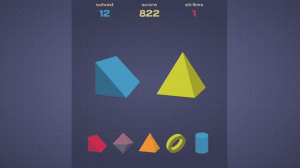
Each round of Shape Match Puzzle Challenge presents a single target shape and a set of possible matches. Your job is to select the option that matches the target before the ten-second timer reaches zero. The game does not ask you to rotate, resize, or combine shapes; it tests pure visual recognition and quick decision-making. Points are awarded for correct answers, and a streak counter tracks consecutive successes. A wrong pick or a missed timer ends the current streak, resetting your progress toward a high score.
Progression and Pace
The difficulty curve is built into the timer and the answer choices. As you answer correctly, the game increases its pace, giving you less time to scan the options and commit to a choice. This progressive speed-up means early rounds feel forgiving while later rounds demand sharper focus and faster reactions. The endless format means there is no final level to beat; instead, the challenge is to see how long you can maintain an accurate streak before the pressure causes a mistake.
Controls and Session Flow
Shape Match Puzzle Challenge uses a single input method: tap or click the shape you believe matches the target. There are no complex controls to learn, which makes the game accessible to players of all ages. Rounds are short, so you can play in brief bursts or chain multiple sessions together. The high-score system gives you a reason to return, and because each round is self-contained, there is no penalty for stepping away and coming back later.
Tips for Sharper Play
Focus on the target shape first, then scan the options; jumping straight to the answers often leads to near-miss errors. Stay calm under the timer, since rushing tends to produce mistakes that break your streak. Over time, you will build a mental library of common shapes, which speeds up recognition. Setting small personal goals, such as beating your previous high score, can keep practice sessions productive without adding pressure.
Compatibility
Faq
Comments
Sign in to comment
You must be logged in before posting a review or rating.
No comments yet. Be the first to comment!










Editorial Notes