← Back to Games
Highway Rush Navigation
Developer: Fun Core Interactive
Published: 2026-10-01
Updated: 2026-10-01
Loading Game Image...
Reviews
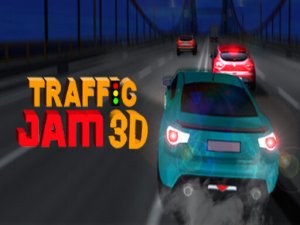
Highway Rush Navigation trades racing spectacle for a quieter skill: predicting how other drivers will move and choosing gaps before they close. The first-person view and proximity cues make that decision-making tangible. Four modes cover structured progression, endurance, timed runs, and practice, while credits fund handling and boost upgrades. It suits players who enjoy deliberate, low-frills driving challenges rather than arcade speed.
Description
Reading Traffic at Speed
Highway Rush Navigation is not a racing game in the traditional sense. Your car holds a baseline speed on a multi-lane highway, and the real challenge is anticipating how surrounding vehicles will move. You steer left and right, accelerate, and brake to position yourself in gaps. A short speed boost helps when traffic closes in, but the core skill is reading the road ahead and committing to calculated lane changes before a gap disappears.Control Response and In-Car Feedback
The game uses keyboard inputs for steering, acceleration, and braking, with a sensitivity curve that favors precise adjustments over twitch reactions. A first-person camera places you inside the vehicle, which makes proximity to other cars feel immediate. Visual and audio cues signal how close you are to nearby traffic, giving you information to judge safe distances without relying only on the screen.Four Modes, Four Approaches
Career mode builds through increasingly difficult traffic scenarios. Infinite mode removes the endpoint and tests endurance against a continuous stream of vehicles. Time Attack asks you to reach a target distance before the clock runs out. Free mode drops the pressure entirely, giving you space to practice lane changes and boost timing. Each mode rewards consistency and foresight rather than raw speed.Credits, Upgrades, and Vehicle Choice
Completing objectives earns credits that go toward handling, acceleration, and boost capacity. New car models unlock over time, each with slightly different characteristics. A nimble compact car and a stable sedan handle differently in dense traffic, so the upgrade path lets you lean into a preferred driving style without changing the fundamental task of navigating other vehicles.Compatibility
▸ Desktop: Chrome / Edge / Firefox / Safari
▸ Mobile: iOS Safari / Android Chrome
▸ Tablet: iPadOS Safari / Android Tablet Browser
Keep your browser updated for the best experience
Faq
Does Highway Rush Navigation have a traditional race format?
No. There is no starting line or finish line in the usual sense. You share the highway with other cars and try to travel as far as possible without a collision. Speed matters only as a tool for reaching gaps, not as the primary objective.
What is the difference between Infinite mode and Free mode?
Infinite mode keeps traffic coming endlessly and measures how long you survive. Free mode removes the pressure of a run, giving you a relaxed environment to practice lane changes, boost timing, and reading traffic patterns before you commit to a scored attempt.
Can I upgrade my car in Highway Rush Navigation?
Yes. Credits earned from completing objectives can be spent on handling, acceleration, and boost capacity. These upgrades change how your vehicle responds in traffic, and new car models become available over time with slightly different characteristics.
What perspective does the game use?
The game uses a first-person view from inside the vehicle. This perspective is tied to the feedback system: visual and audio cues about nearby cars help you judge safe distances, and close calls feel immediate because you are seeing the road from the driver's position.
Is there a time limit in every mode?
No. Time Attack is the only mode with a clock, asking you to reach a target distance within a set period. Career mode focuses on scenario difficulty, Infinite mode on endurance, and Free mode on practice without time constraints.
What controls does Highway Rush Navigation use?
The game uses keyboard inputs for steering left and right, acceleration, and braking. A temporary speed boost is available for short bursts. The controls are tuned to be responsive without being overly sensitive, supporting the precise adjustments needed for lane changes in dense traffic.
Comments
Sign in to comment
You must be logged in before posting a review or rating.
No comments yet. Be the first to comment!






Editorial Notes